
How Azquo Thinks
Most database systems force you to decide how your data is structured before you can use it.
Azquo doesn’t.
Names, Not Tables
Most databases store data in tables — fixed grids of rows and columns where every record must conform to a predetermined structure. Azquo does something fundamentally different. It stores data as names organised into hierarchies.
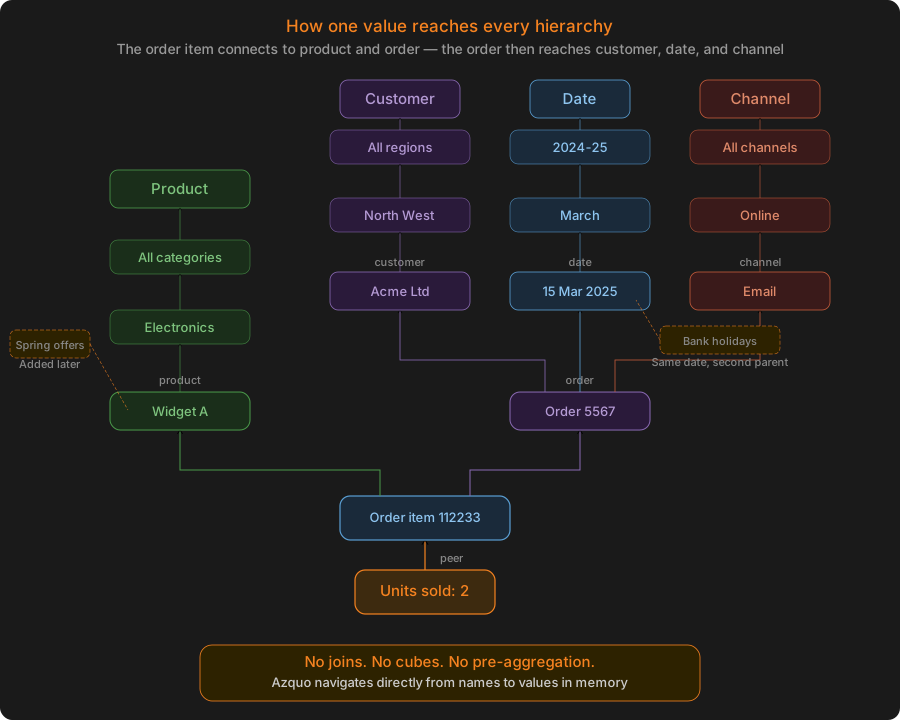
A name is any concept your business uses: a product, a customer, a week, a cost centre, a sales channel, a scenario. Names are not confined to a single table or dimension. A name can belong to any number of hierarchies simultaneously — “May“ can be a month in the date hierarchy and a member of “Bank Holidays“ at the same time. A product can sit under its category, its supplier, its warehouse location, and any ad-hoc grouping you create later.
This is closer to how people actually think about data than the rigid table structures that conventional databases impose.
Values Anchored to Names, Not Cells
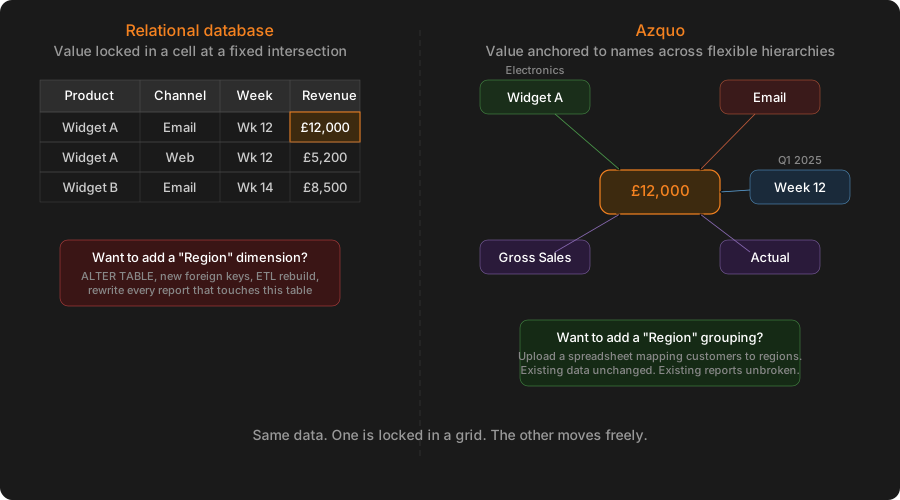
In a spreadsheet, a number lives in a cell. Move the cell, lose the number. In a relational database, a number lives in a row. Change the table structure, and you need migration scripts.
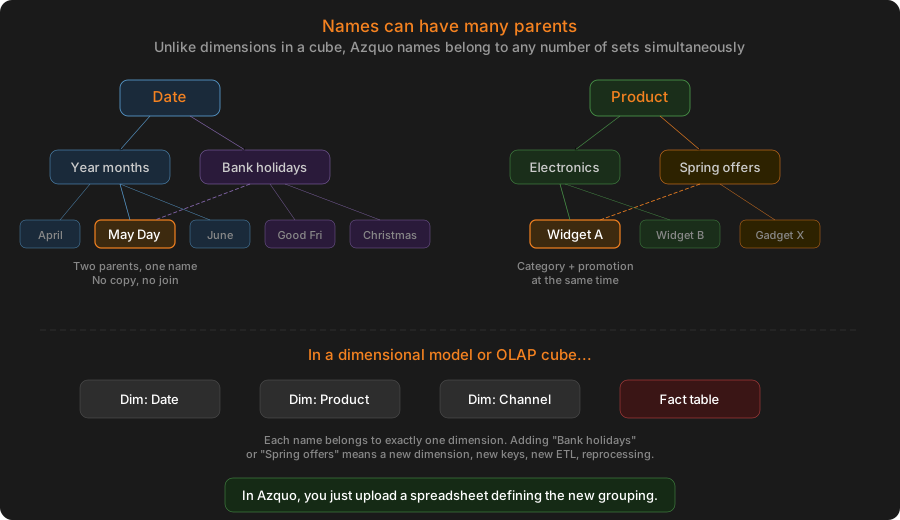
In Azquo, a numeric value is anchored to a set of names — its peers. A revenue figure of £12,000 might be attached to the names “Week 12“, “Email“, “Actual“, “2024/25“, and “Gross Sales“. That single value is then automatically queryable by any combination of those names, at any level of aggregation, without pre-built cubes or summarisation steps.
Because the value is linked to names rather than to a position in a grid, new ways of slicing the data can be introduced at any time — without touching the data itself.
Structure That Evolves Without Disruption
In conventional systems, changing how data is organised — adding a new reporting dimension, regrouping products, introducing a regional breakdown — typically requires schema changes, ETL modifications, and IT involvement.
In Azquo, you upload a simple spreadsheet that defines the new grouping, and it becomes immediately available in every report. The existing data does not move. The existing reports do not break. The new hierarchy simply provides an additional lens through which the same data can be viewed.
This is possible because names have no dimensional constraints. Adding a name to a new hierarchy is like adding a word to a new sentence — it does not change the word‘s meaning in any other sentence.
In-Memory, with Direct Links
Azquo holds its entire database in memory, with direct links between names and values. There is no query compilation step, no index lookup, no join operation. When a report asks for data, Azquo navigates directly from the names in the report headings to the values attached to them.
This is what makes Azquo fast enough to sit behind a live Excel spreadsheet — the response time is fast enough that the spreadsheet feels as if the data is local, even when the database holds millions of records.
Spreadsheets as the Interface, Not a Workaround
Many systems treat Excel as an export destination — a place where data lands after being extracted from the “real“ system. Azquo treats Excel as the primary interface.
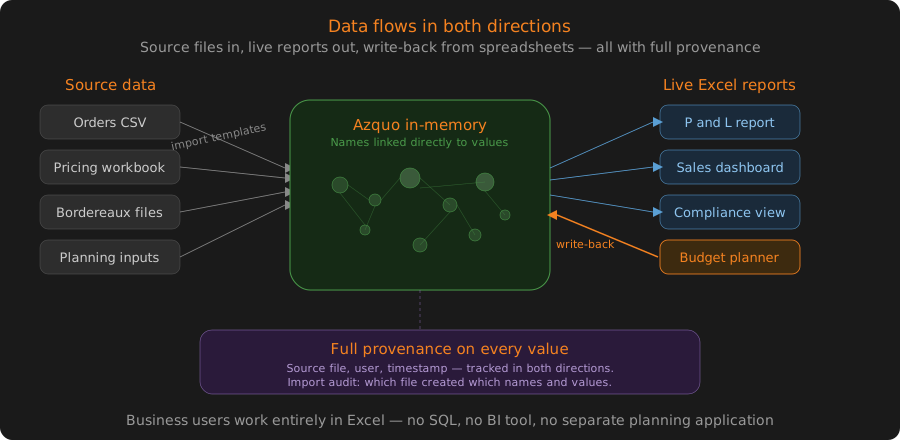
Reports are ordinary Excel workbooks connected live to the database. The connection runs in both directions: data flows into the spreadsheet for analysis, and values entered or calculated in the spreadsheet can be written back to the database. Every value carries full provenance — source file, user, and timestamp — so the audit trail is maintained regardless of which direction the data travels.
This means business users work entirely within Excel. They do not need SQL, a BI tool, or a separate planning application. The spreadsheet skills they already have are sufficient.
How data gets in
Azquo accepts data from several routes, all of which feed into the same name/hierarchy/value structure.
The simplest is a direct upload — a CSV or Excel file dropped into Azquo via the web interface. If the file’s column headers already contain Azquo instructions (which names to create, which hierarchies to place them in, which values to attach), the file is self-describing and needs no further setup. For files that arrive in their original format — ERP exports, accounting extracts, third-party feeds — a separate import template tells Azquo how to interpret the columns. Once defined, the same template handles every subsequent file with the same structure, with no manual intervention.
For data that lives in other systems, Azquo can connect directly to external databases and import in real time — so the Azquo database stays current without anyone uploading files at all. The same applies in reverse: Azquo can write data out to external databases in real time, keeping downstream systems synchronised with values that have been entered or calculated within Azquo.
The third route is the spreadsheet itself. Values entered or calculated in a connected Excel workbook are written back to the database with the same provenance tracking as any other source. This means planning figures, manual adjustments, and formula-driven allocations all enter the database through the same mechanism as automated feeds — and carry the same audit trail.
Regardless of route, every value that enters the database records where it came from: source file, user, and timestamp. There is no separate logging layer — provenance is built into the data itself.
How reports work
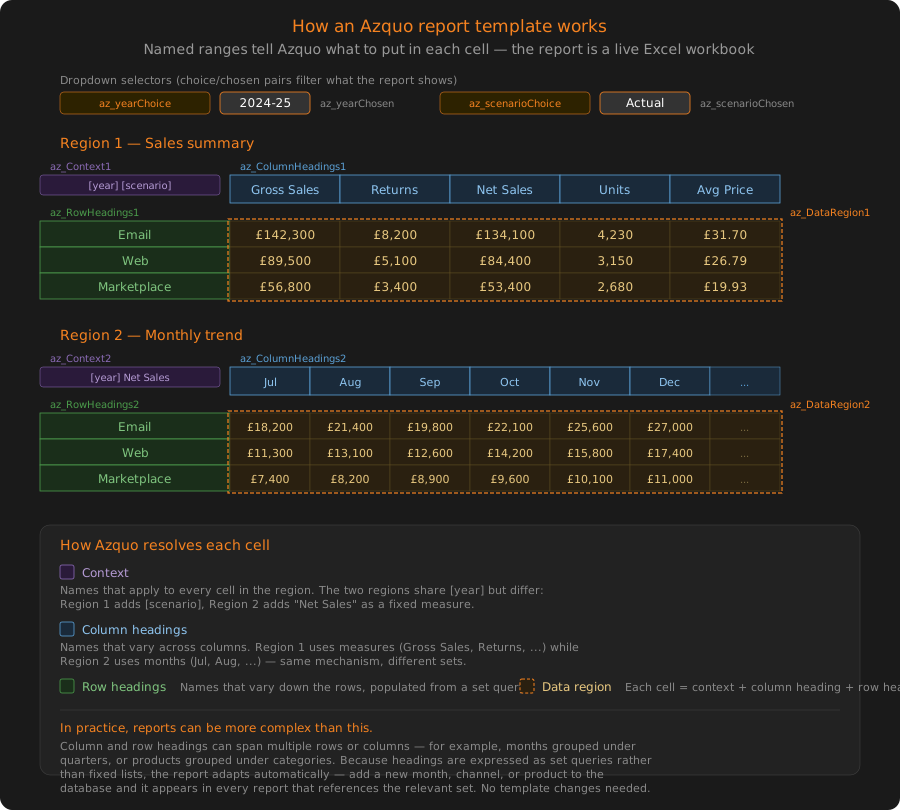
A report in Azquo is an ordinary Excel workbook. Specific cells define the row headings, column headings, and context — Azquo resolves the rest. For example, rows defined as the children of “All Months” and columns as the children of “Ecommerce Channels” produce a month-by-channel matrix without writing any query language. Dropdown selections can filter by year, division, or scenario — again, defined by naming a set in the spreadsheet, not by coding a filter.
Because the report references Azquo names rather than fixed cell ranges, the same template adapts automatically when the underlying data changes. Add a new month’s data or a new channel, and the report picks it up — the template does not need editing. Load a different division’s figures into the same database, and the same report template produces the corresponding analysis.
The connection between spreadsheet and database runs in both directions. Data flows from the database into the report for analysis, and values entered or calculated in the spreadsheet can be written back. This means variance analysis, allocation models, and what-if scenarios can be built as standard Excel formulae within the report template — the results are stored in the database with full provenance, just like any imported value.
Business users build and modify their own reports by editing the spreadsheet directly. They do not need SQL, a BI tool, or a separate planning application. The spreadsheet skills they already have are sufficient.
AI-Ready by Design
Azquo’s architecture turns out to be well suited to AI. The name/hierarchy model is closer to natural language than relational schemas are — concepts are organised the way people describe them, not the way machines traditionally store them.
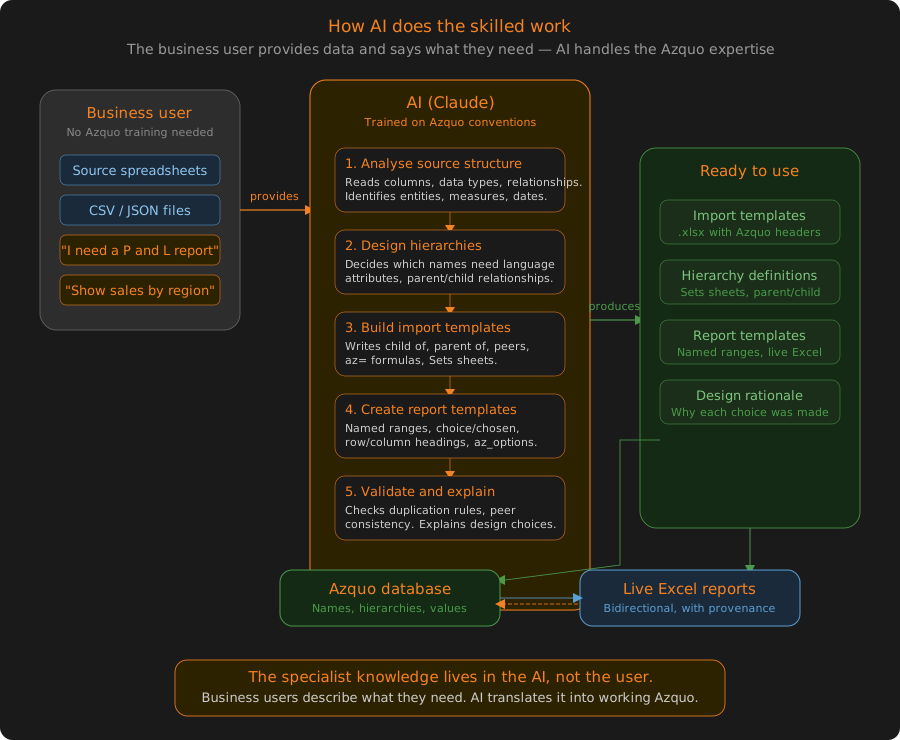
This is no longer a hypothesis. Azquo has a working MCP (Model Context Protocol) server through which AI agents can create databases, import files, query, browse hierarchies, and audit any figure back to its source. In a recent demonstration, Claude (Anthropic’s AI) built a complete insurance loss-cost database from a 168-page ISO Commercial Auto filing covering 73 territories — designing the import templates and reports itself, with no Azquo specialist involved.
The two tasks that traditionally required Azquo expertise — designing import templates and building reports — are exactly the tasks AI handles well. The result: a business user can put raw files in front of an AI agent and get a structured, auditable database out, while every design decision the agent makes is recorded in the database for the next agent to build on.
We are writing about what we learn on our blog.
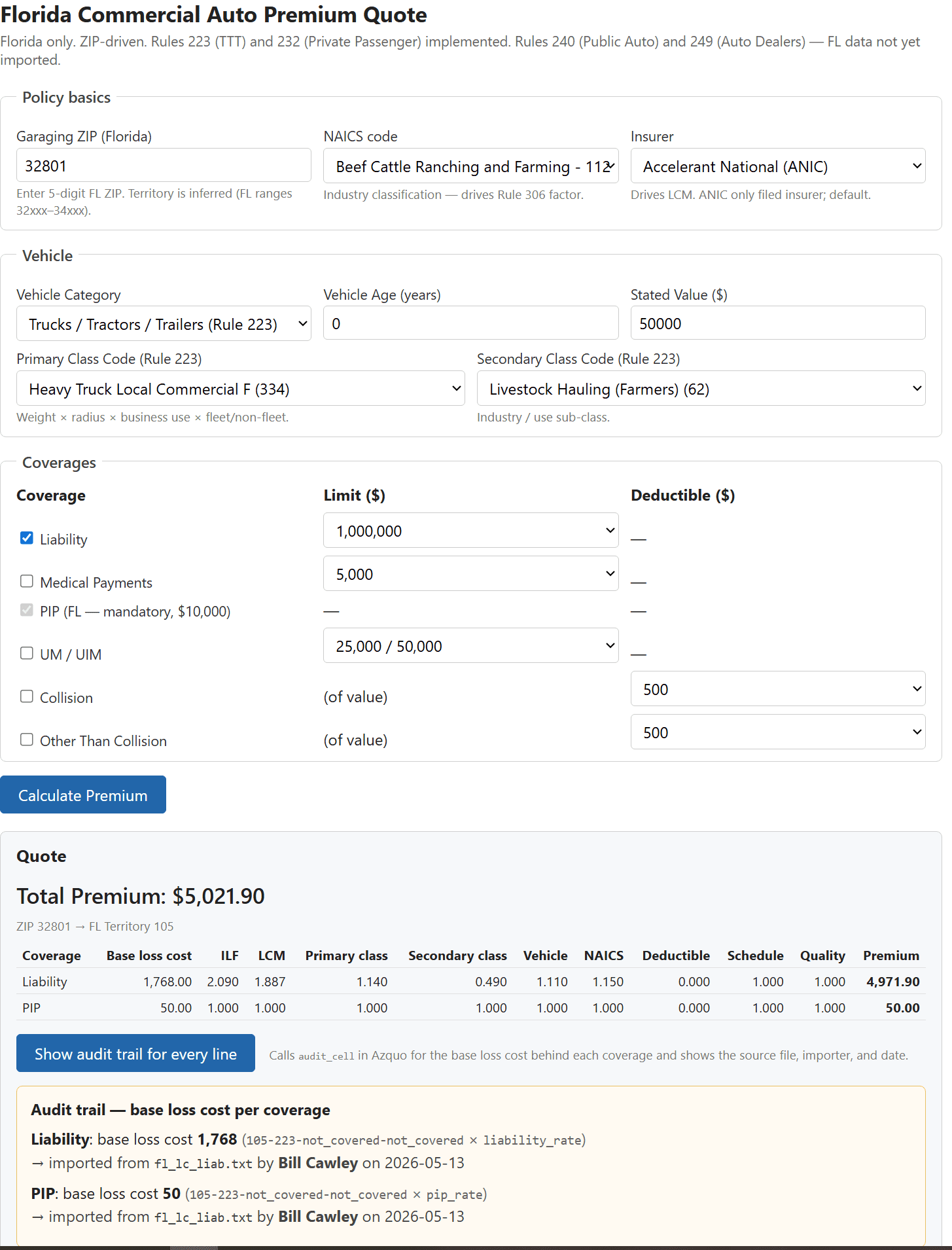
Audit any figure back through every transformation to its source — file, importer, date. Demonstrated here on a live quote in our Auto_Rating reference database.
When Azquo is the Right Choice
Azquo occupies the space between relational databases and OLAP cubes. It is not a replacement for a transactional database that processes millions of identical operations per second. It is designed for situations where:
- Data arrives from multiple sources in different formats
- Reporting requirements change frequently
- Business users need to build and modify their own analytical models
- Audit trails and provenance matter
- The organisation already relies on spreadsheets and does not want to abandon them
If your data fits neatly into a fixed relational schema and your reporting needs are stable, a conventional database will serve you well. Azquo is for the cases where they don‘t.