
Your data platform stays. Azquo works beside it.
How Azquo fits with Databricks, Snowflake, SQL Server and the other databases large organisations run on.
The part of the work the big platforms were not designed for
Large organisations now keep their data in platforms built for scale — Databricks, Snowflake, BigQuery — with transactional systems such as SQL Server and Postgres underneath. Those platforms are very good at what they do, and Azquo does not try to replace any of them.
Azquo is for the figures people and AI agents actually reason with. Budgets and forecasts. The reconciled numbers behind a board pack. The assumption somebody made last quarter, and why. The way the business groups its products, regions and accounts this year, which is not how it grouped them last year.
That working set usually lives in spreadsheets, where it has no history, no audit trail and no single version. Azquo gives it a home: exact, structured, and traceable back to where every number came from.
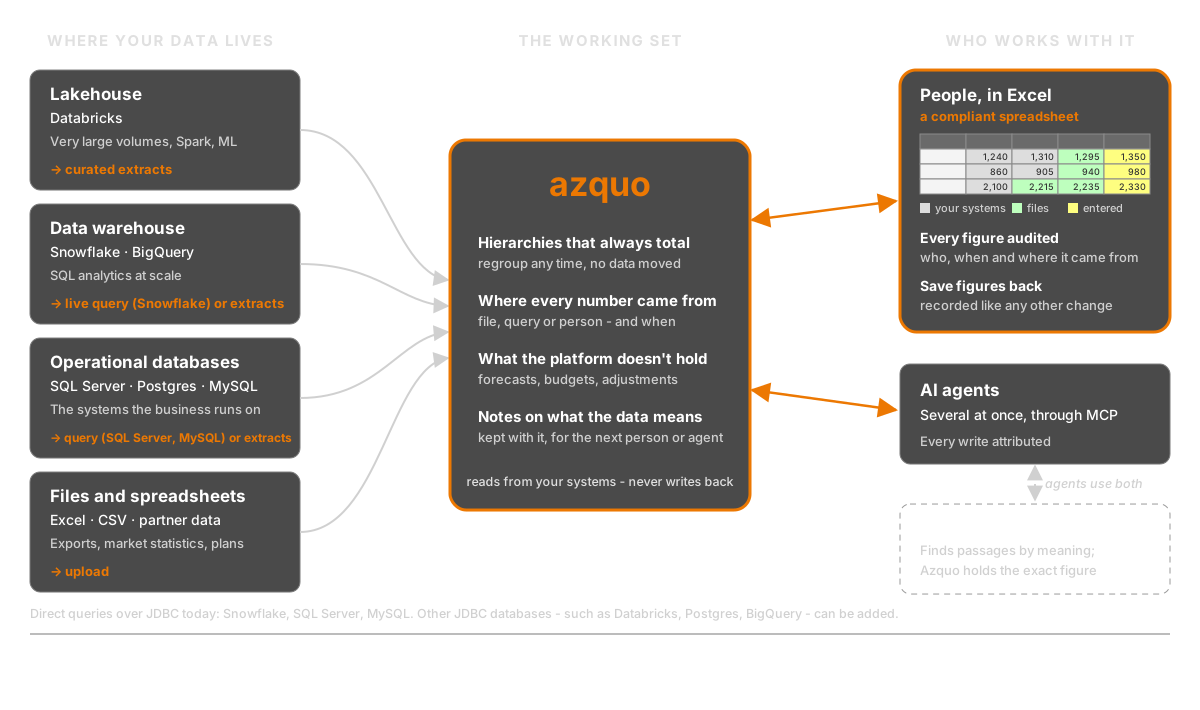
What each kind of database does best — and where Azquo fits
We would rather be clear about where other databases are the better choice. Most organisations need several of these, and Azquo is meant to sit alongside them.
Lakehouses — Databricks
Best at: storing and processing very large volumes of data — structured and unstructured — with Spark, machine-learning pipelines, streaming, and governance across the whole estate. Nothing in Azquo competes with this. If the question is “process ten billion events”, the answer is Databricks, not Azquo.
Where Azquo fits: take the curated, aggregated tables the business actually plans and reports from, and load them into Azquo. There, finance and operations teams — and their AI agents — add the hierarchies, forecasts, assumptions and adjustments that the lakehouse does not hold, with every figure traceable to the extract it came from.
How it connects today: by loading extracts — CSV, Excel or zip files, by upload or from a URL. Azquo queries databases over JDBC, so a direct connection to Databricks can be added when a customer needs it.
Cloud data warehouses — Snowflake, BigQuery
Best at: fast SQL over very large tables, many users at once, and the whole ecosystem of BI and data tools built around SQL. For warehouse-scale analytics they are far ahead of Azquo.
Where Azquo fits: the same as for a lakehouse — Azquo holds the planning, reconciliation and judgement layer on top of the warehouse’s figures, and works through Excel for the people who use it.
How it connects today: Snowflake is built in. Azquo connects with a read-only login, runs a query and imports the result; figures that arrive this way are marked as coming from the business’s own systems, and the source system is never changed. BigQuery data comes in as extracts today; a direct connection can be added in the same way.
Relational databases — SQL Server, Postgres, MySQL
Best at: running the business’s transactions — orders, ledgers, customer records — with strict integrity, high volumes of small updates, and decades of tools and skills behind them. Azquo is not a transactional system and should never be used as one.
Where Azquo fits: Azquo reads from them and never writes back. It adds what a relational schema finds hard to change quickly — new groupings, a second hierarchy over the same accounts, a forecast column that did not exist last month — without a migration.
How it connects today: by a read-only query over a JDBC connection — Microsoft SQL Server and MySQL are supported now, alongside Snowflake — or from extracts. Other JDBC databases, such as Postgres, can be added.
Document databases — MongoDB
Best at: flexible application data whose shape varies from record to record, at high volume, for the applications built on it.
Where Azquo fits: extracts of the figures that matter for reporting and planning, organised into hierarchies that total correctly.
Graph databases — Neo4j
Best at: following relationships — paths, networks, “who is connected to whom, through what” — quickly and at depth. For relationship traversal they are better than Azquo.
Where Azquo fits: Azquo also lets one thing belong to many groups at once, but its strength is different — it makes the totals over those groupings exact, and keeps where each number came from.
Vector databases — Pinecone, pgvector and others
Best at: finding text, images or documents by meaning — “passages similar to this one” — which is what retrieval for AI assistants relies on. Azquo does not do similarity search.
Where Azquo fits: the two complement each other. A vector store finds the paragraph that looks relevant; Azquo holds the exact figure, and says whether it is the current one and where it came from. An agent can use both.
Spreadsheets — Excel
Best at: being on every desk, flexible, understood by everyone.
Where Azquo fits: Azquo works through Excel rather than against it. Reports are Excel workbooks that Azquo fills with figures; with the Azquo add-in, people can save figures back and trace any number to its source. The spreadsheet stays; what it loses is the copy-of-a-copy problem.
What Azquo adds
- Totals that are always right. Each number is stored once, against the individual things it describes, so every hierarchy over it adds up — and groupings can be added or reorganised at any time without moving data.
- Where every number came from. Each value records its source — a file, a database query, a report — who put it there, and when; earlier values are kept.
- No schema to design first. New data and new groupings can be added as understanding grows, without breaking existing reports.
- The meaning kept with the data. Notes explaining what the data means, how it is loaded and what was decided are stored in the database itself, for the next person or AI agent.
- Several AI agents, one record. Agents and the people working with them can share one database; every write is attributed to the agent and the person behind it. Agents connect through Azquo’s MCP server.
- Never locked in. An Azquo backup is a plain text file; we have tested that an AI given nothing but a backup can read back every name, figure and change.
What Azquo is not
- Not a transactional system. It sits beside the systems a business runs on; it does not replace them.
- Not a warehouse-scale analytics engine. It is built for the working set people plan and report from, not for billions of raw rows.
- No similarity search. Finding text by meaning is a vector database’s job.
- Not queried in SQL by BI tools — yet. Today Azquo’s figures reach people through Excel, the browser and AI agents.
- A hosted service. Azquo runs on Azquo’s servers; a version for a customer’s own machine is not yet available.
A typical arrangement
- The platform does the heavy lifting. Databricks or Snowflake collects and processes the raw data, as it does today.
- A curated extract reaches Azquo. A query (Snowflake, SQL Server or MySQL today) or a regular file brings the tables the business plans from into Azquo — read-only, and marked with where they came from.
- People and agents add what the platform does not hold. Forecasts, budgets, adjustments, new groupings and the notes that explain them, all attributed.
- Reports come out in Excel. Every figure can be traced back — to the extract, the query, or the person who entered it.
Nothing about the platform changes. The only thing Azquo asks of it is access to data people can already read.